Image to Prompt logo Image to prompt Install the extension

How to change the background of a photo with AI

Upload your photo to ChatGPT or Gemini and ask it to replace only the background, keeping the person or product, the hair edges and the lighting exactly as they are. Pick a new background below and copy a prompt that says all of that for you.

Updated · Works with ChatGPT and Gemini (Nano Banana)

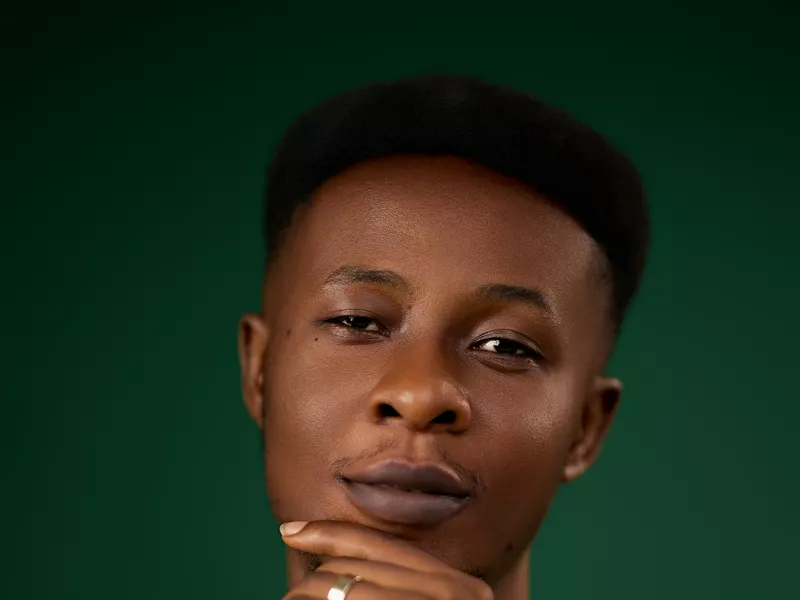
Young man in a grey turtleneck posing against a dark green studio backdrop
The same portrait can sit on a studio wall, in an office or on a beach. Photo: McFollis / Unsplash

Build your background prompt

Choose the new background and what is in your photo. The prompt updates as you click.

New background
What is in your photo
For
Options
Open ChatGPT

How to change the background of a photo, step by step

  1. Start with a sharp photo. The subject should be in focus and not cut off at the edges. Busy or blurry backgrounds are fine; the AI replaces them.
  2. Open ChatGPT or Gemini and attach the photo with the + button.
  3. Paste your prompt from the builder and send it.
  4. Check the edges. Look at hair, glasses, fingers and the outline of the product. If something looks cut out, reply “blend the edges of the hair more naturally”.
  5. Check the light. If the subject looks pasted in, reply “match the light on me to the new background”.

Six background prompts to copy

Each prompt is written for a photo of one person, except the white background, which is written for a product. The builder above adapts any of them for groups, products and pets. The photos below are real reference photos, not AI results.

Woman in glasses and a black vest posing against a plain light grey studio backdrop

Light studio background

Replace only the background of the photo I uploaded. Keep me exactly as I am: face, expression, hair, clothing, pose and the edges of my hair. New background: a seamless light grey studio backdrop with a soft gradient, like a professional portrait session. Even, soft studio light on me that matches the backdrop, and a soft natural shadow behind me. Keep the same framing and image size. Make it look like a real photograph, not a cut-out.

Reference: Thanh Duc PHAN / Unsplash


Plain white ceramic mug on a white background

Pure white background for products

Replace only the background of the photo I uploaded. Keep the product exactly as it is: shape, colors, materials, label text and logo, with no changes. New background: pure white (#FFFFFF), with no texture or gradient. Center the product, keep it sharp and add a soft, subtle shadow directly beneath it. Keep the same framing and image size. Make it look like a real product photograph, not a cut-out.

Reference: Giorgio Trovato / Unsplash
Smiling woman in a navy blazer leaning on a wall in a bright office with desks and large windows

Office background

Replace only the background of the photo I uploaded. Keep me exactly as I am: face, expression, hair, clothing, pose and the edges of my hair. New background: a bright, modern office with large windows, desks and plants, slightly out of focus. Soft daylight from the windows that matches the light on me, and a soft natural shadow where I stand. Keep the same framing and image size. Make it look like a real photograph, not a cut-out.

Reference: LinkedIn Sales Solutions / Unsplash
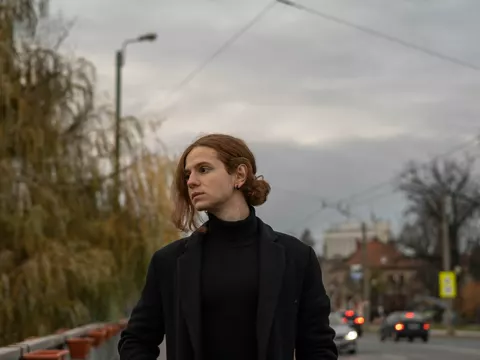
Young man in a black coat standing on a city sidewalk on an overcast day, street and cars behind him

City street background

Replace only the background of the photo I uploaded. Keep me exactly as I am: face, expression, hair, clothing, pose and the edges of my hair. New background: a city street with buildings, parked cars and street lamps on an overcast day. Soft, cool daylight that matches the light on me, the horizon at the right height for my camera angle, and a soft natural shadow on the sidewalk. Keep the same framing and image size. Make it look like a real photograph, not a cut-out.

Reference: Adrian “Rosco” Stef / Unsplash
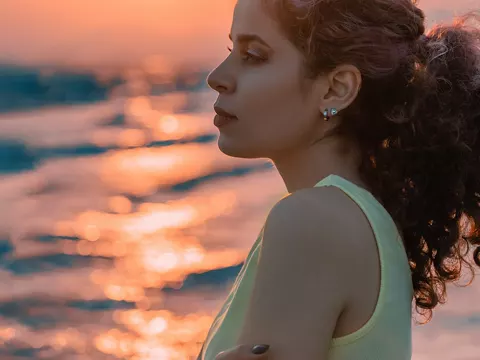
Woman with curly hair in profile in front of the sea glowing orange at sunset

Beach at sunset

Replace only the background of the photo I uploaded. Keep me exactly as I am: face, expression, hair, clothing, pose and the edges of my hair. New background: a calm sea at sunset with a warm orange sky. Warm golden light on me from the direction of the sun, with a soft rim light on my hair. Keep the same framing and image size. Make it look like a real photograph, not a cut-out.

Reference: Pooria Shahriari / Unsplash
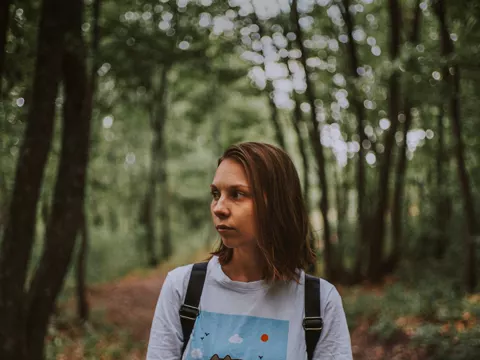
Woman with a backpack standing on a path in a green forest

Forest background

Replace only the background of the photo I uploaded. Keep me exactly as I am: face, expression, hair, clothing, pose and the edges of my hair. New background: a green forest path with tall trees, softly out of focus. Soft, diffused daylight with a slight green tint that matches the light on me, and a soft natural shadow on the path. Keep the same framing and image size. Make it look like a real photograph, not a cut-out.

Reference: Alex Gagareen / Unsplash

Why some AI background changes look fake

An AI background changer swaps the pixels behind you in seconds. What gives it away is everything around the edges. Ask for these four things and the result looks like one photo, not two:

Change the background of a product photo

For online stores, choose “A product” and “Pure white” in the builder. Marketplaces such as Amazon ask for a pure white background on the main product image, so the prompt asks for #FFFFFF with no gradient.

Questions

Can ChatGPT change the background of a photo?
Yes. Upload the photo, paste a prompt that asks it to replace only the background and keep the subject unchanged, and send it. ChatGPT returns a new image with the new background.
Can Gemini change the background of a photo?
Yes. Gemini's image model (Nano Banana) edits uploaded photos. Start the prompt with “Edit this photo” so it changes your photo instead of creating a new one.
How do I make the background of a photo white?
Choose “Pure white” in the builder. The prompt asks for a #FFFFFF background with no gradient and a soft shadow under the subject, which is what most online stores expect.
Will the AI change my face?
It can, slightly. The prompts on this page ask the AI to keep your face, hair and clothing exactly as they are. If something changes, reply “keep my face identical to the original photo” in the same chat.
Can I just blur the background instead of replacing it?
Yes. Tick “Blur the new background”, or ask for “the same background, softly out of focus, like a portrait lens”.

More guides

Photos on this page are real reference photos from Unsplash, used under the Unsplash License, to show each background. They were not made with AI.